Add Items by Voice or List
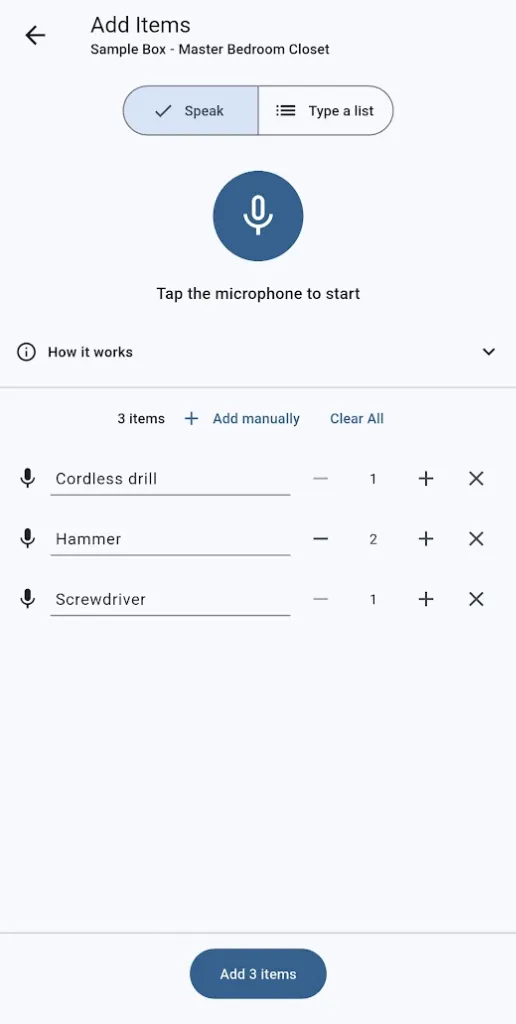
PremiumSay “three extension cords, a dozen eggs” or paste a whole list — SimplyBin™ turns it into items you review before adding. Premium.
- Speak items naturally — “three extension cords”, “a pair of gloves”, “hammer quantity 2”
- Say “next item” to separate items without pausing
- Or type one item per line, including quantities like “Screwdriver x2”
- Every row lands in a review list — edit names, fix quantities, delete mistakes
- Add the whole batch at once, with a 6-second Undo for the entire batch
- Premium feature — mixing speaking and typing works in one visit
Filling a box by typing every item name gets old fast. With Add Items by Voice or List, you just talk: “three extension cords, next item, a pair of gloves” — or paste a typed list, one item per line.
Everything lands in a review list first, so you can fix names and quantities before committing. No speech recognizer? The Type a list tab works anywhere — even with the keyboard’s own dictation.
More features
Boxes & Items
Create storage boxes, fill them with items, and always know what is inside. The heart of SimplyBin™ — free up to 15 boxes and 150 items.
Quick Add Boxes
Label-first setup: create and print a whole shelf of QR-labeled boxes before you fill a single one — free on every plan.
QR Labels
Print QR labels for every box — plain paper or Avery 94101/94106 sheets — and scan to see what is inside without opening a lid.