Quick Add Boxes
FreeLabel-first setup: create and print a whole shelf of QR-labeled boxes before you fill a single one — free on every plan.
- Create up to 50 empty boxes in one batch — each gets its own QR code
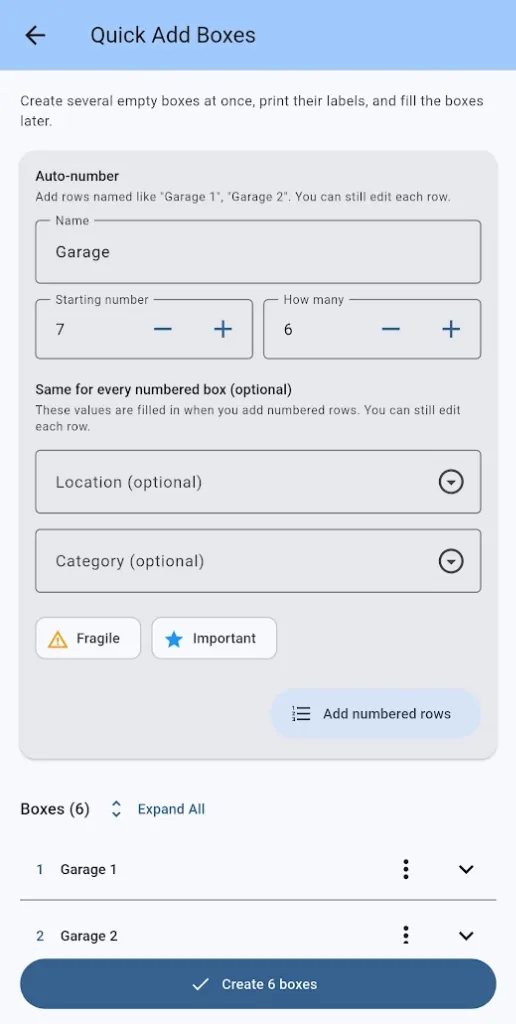
- Auto-number names like “Garage 1” to “Garage 12” with a smart starting number
- Rows copy location, category, and flags so you only type what changes
- Duplicate-name checks catch collisions before anything is saved
- Print labels for the new batch right away — free on every plan
- Edit the batch immediately after creation, then print in row order
Quick Add Boxes flips the usual workflow: label the boxes first, then fill them later. Choose Create several boxes from the Home screen, add or auto-number rows, and create a whole shelf of labeled, empty boxes in one go.
Right after creation you can print every label in row order — on plain paper or Avery sheets — and printing the just-created batch is free even on the Free plan, not capped by the usual per-print limit. Free accounts can create batches up to their remaining 15-box allowance.
More features
Boxes & Items
Create storage boxes, fill them with items, and always know what is inside. The heart of SimplyBin™ — free up to 15 boxes and 150 items.
QR Labels
Print QR labels for every box — plain paper or Avery 94101/94106 sheets — and scan to see what is inside without opening a lid.
Search & Filters
Find any box or item by name, location, category, description, or custom field — with highlighted matches and filters that drive reports.