Search & Filters
FreeFind any box or item by name, location, category, description, or custom field — with highlighted matches and filters that drive reports.
- One search covers boxes and items together, with matching text highlighted
- Searches names, descriptions, locations, categories, custom fields, and loaned-to names
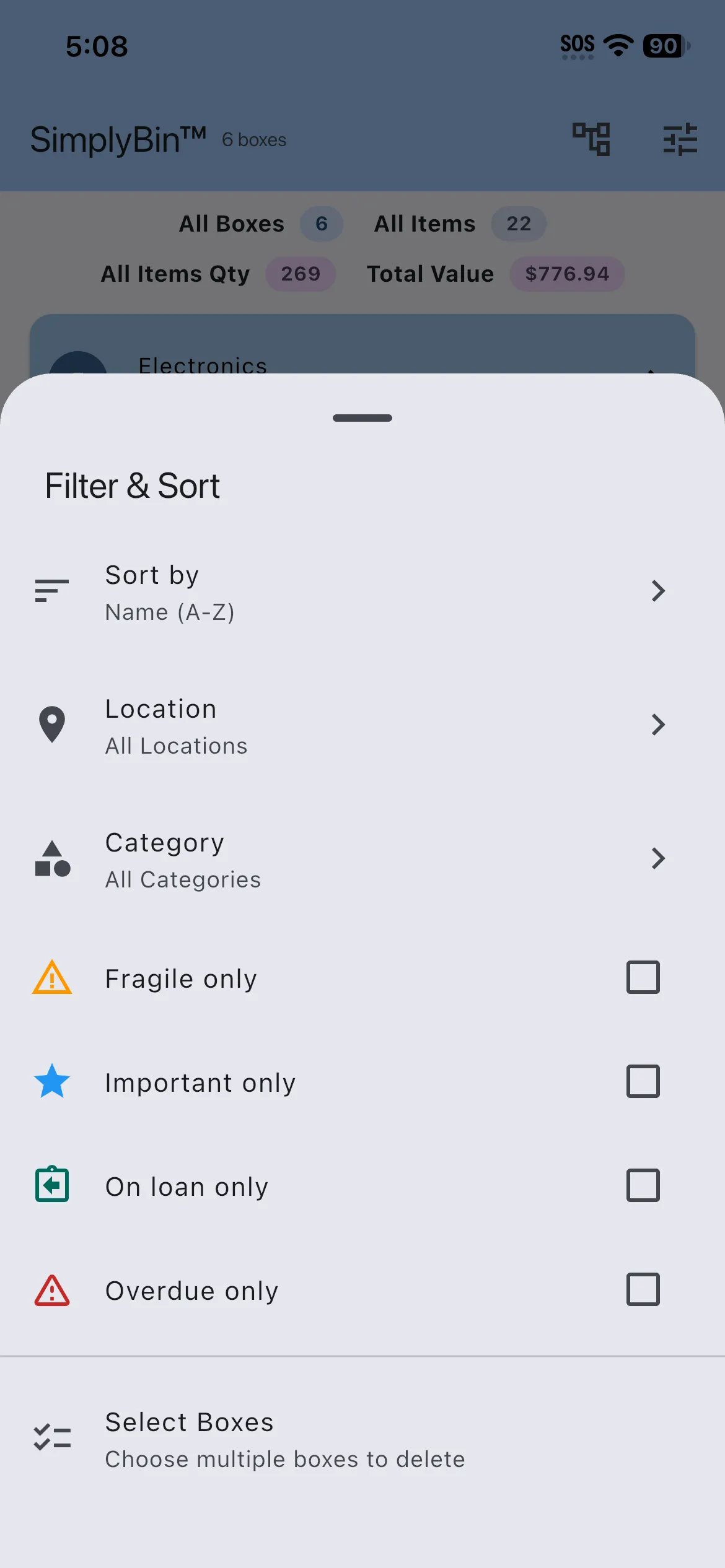
- Sort and filter by name, location, and category — and by on-loan or overdue items
- Custom-field matches show the field, like “Serial Number: SN-48213”
- Filtered results feed totals, printing, and filtered inventory reports
- Everything runs on-device, so search works fully offline
The whole point of an inventory is finding things later. SimplyBin™ searches boxes and items together and highlights exactly what matched — including inside your own custom fields.
Filters do more than narrow the list: the Home screen’s total value updates to the filtered set, you can print QR labels for just the boxes shown, and Premium can export a filtered PDF report in the same order.
More features
Boxes & Items
Create storage boxes, fill them with items, and always know what is inside. The heart of SimplyBin™ — free up to 15 boxes and 150 items.
Quick Add Boxes
Label-first setup: create and print a whole shelf of QR-labeled boxes before you fill a single one — free on every plan.
QR Labels
Print QR labels for every box — plain paper or Avery 94101/94106 sheets — and scan to see what is inside without opening a lid.