Boxes & Items
FreeCreate storage boxes, fill them with items, and always know what is inside. The heart of SimplyBin™ — free up to 15 boxes and 150 items.
- Every box gets a name, optional description, location, category, and photo
- Add items as you create the box — names, quantities, values, and photos
- Mark boxes and items Fragile or Important (Premium) to spot them at a glance
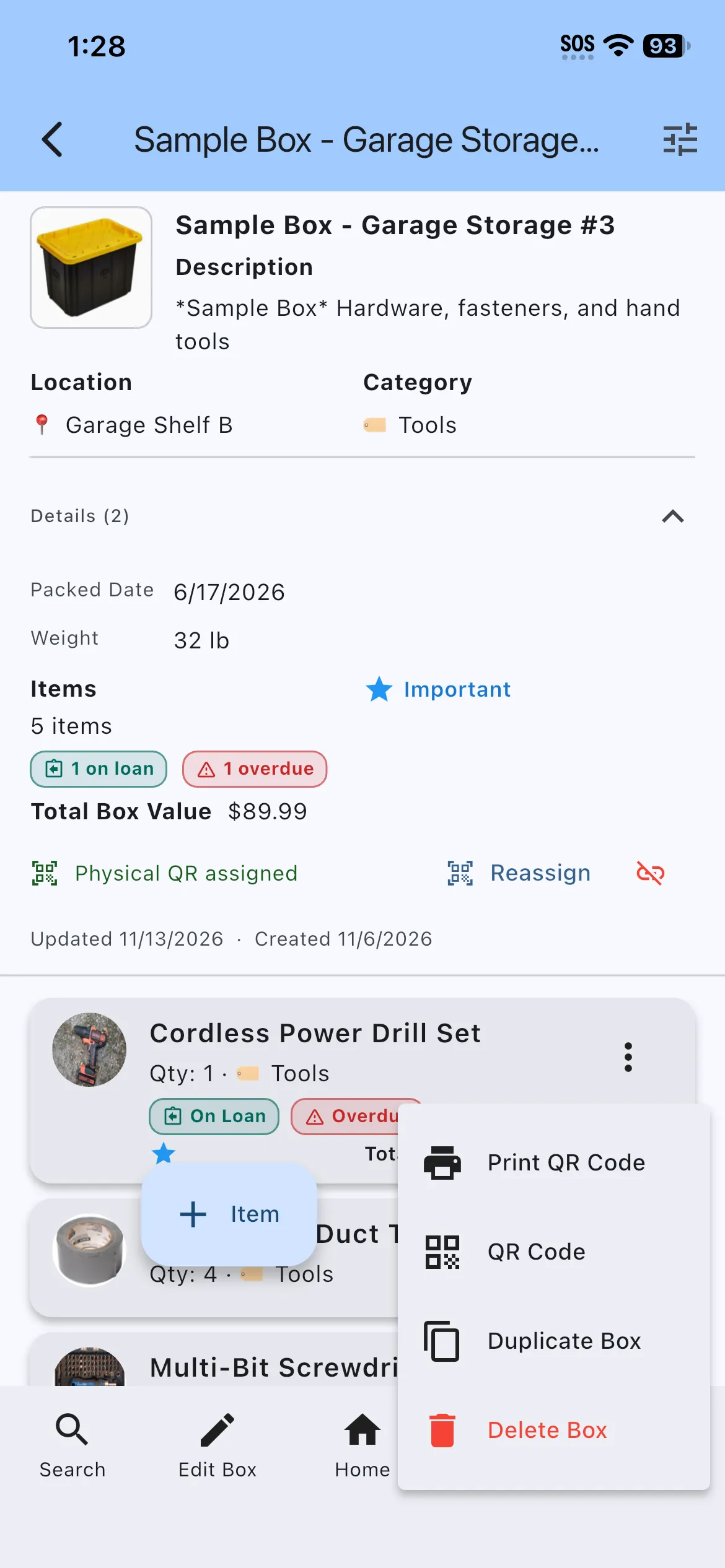
- Compact box detail screen keeps the item list front and center
- Deleting a box offers an Undo snackbar so nothing is lost by accident
- Free up to 15 boxes and 150 items — Premium removes both limits
Boxes are the heart of SimplyBin™. Create a box for every bin, tote, or container you own, give it a location and category, and fill it with items. Each item can carry a quantity, a description, a unit value, a photo, and flags for fragile or important contents.
The box detail screen puts the item list first, with the box’s location, category, QR status, and total value grouped tightly above it. Duplicate a whole box with one tap (Premium), or move items between boxes when you reorganize.
More features
Quick Add Boxes
Label-first setup: create and print a whole shelf of QR-labeled boxes before you fill a single one — free on every plan.
QR Labels
Print QR labels for every box — plain paper or Avery 94101/94106 sheets — and scan to see what is inside without opening a lid.
Search & Filters
Find any box or item by name, location, category, description, or custom field — with highlighted matches and filters that drive reports.