QR Labels
Free + PremiumPrint QR labels for every box — plain paper or Avery 94101/94106 sheets — and scan to see what is inside without opening a lid.
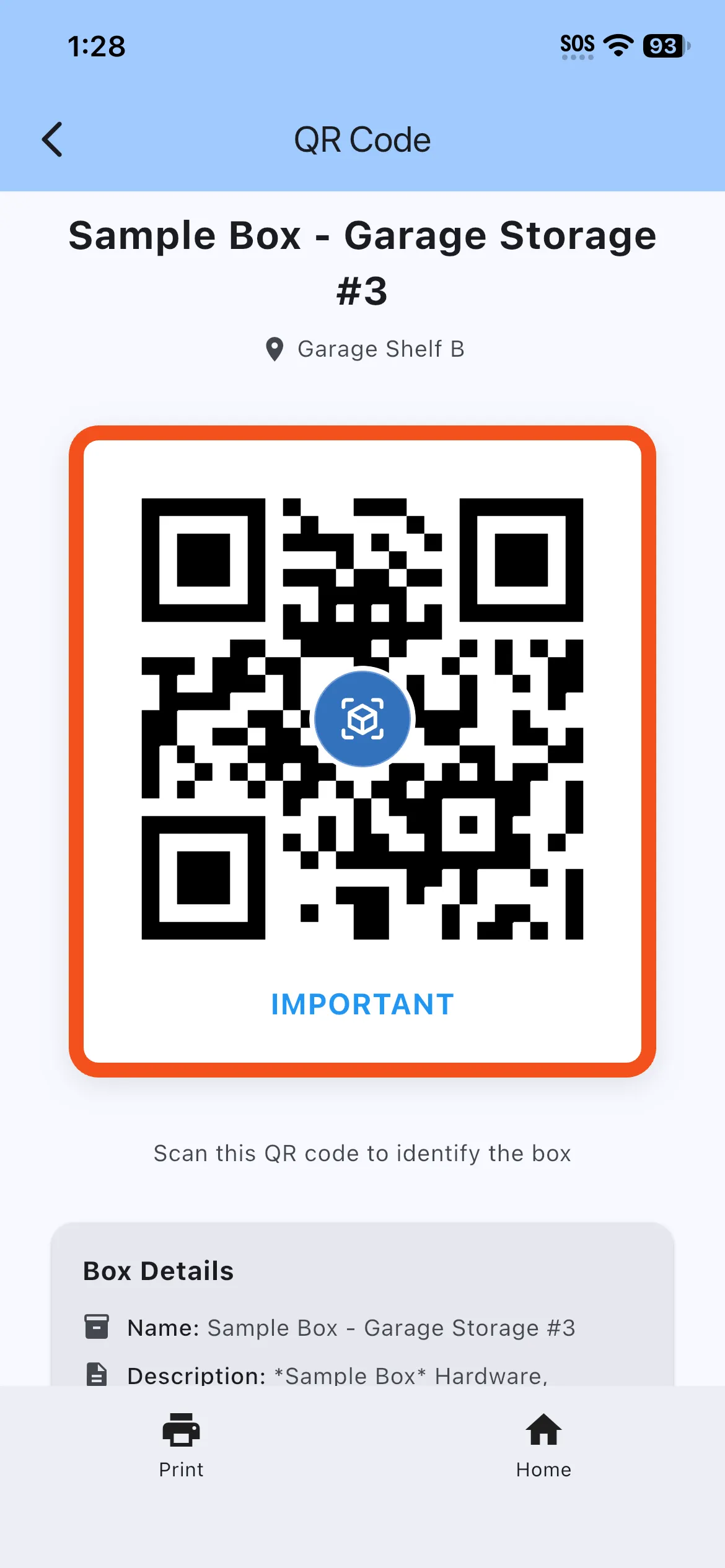
- Every new box gets a QR code automatically — scan it to open the box instantly
- Print on Standard 8.5"×11", Avery 94101 3"×3", or Avery 94106 1.5"×1.5" sheets
- Generic QR labels: print ahead, stick them on, link each to a box later
- Labels can show name, location, FRAGILE/IMPORTANT warnings, and category-color borders
- Bulk printing and generic labels are free up to 15 at a time
- Premium removes print limits (up to 100 generic labels) and unlocks QR reassignment
Stick a QR label on a box and scanning it opens that box’s contents — no digging, no guessing. SimplyBin™ generates a code for every box automatically, or you can assign a printed label yourself.
Print labels for one box, every box, or just your filtered boxes. Generic labels let you prep a stack ahead of a big organizing weekend and link each one later — or even create the box by scanning the label. Premium lifts the 15-per-print cap and lets you reassign a code to a different box.
More features
Boxes & Items
Create storage boxes, fill them with items, and always know what is inside. The heart of SimplyBin™ — free up to 15 boxes and 150 items.
Quick Add Boxes
Label-first setup: create and print a whole shelf of QR-labeled boxes before you fill a single one — free on every plan.
Search & Filters
Find any box or item by name, location, category, description, or custom field — with highlighted matches and filters that drive reports.